
The Vendor’s Playbook 📈
Got something worth selling?
Whether you’re an individual clearing out items you no longer need, an entrepreneur building a business, or an established retailer looking for another way to reach customers, BidZid gives you the tools to list, sell and auction your products online.
Getting started is straightforward.
Here’s how it works.
1. Register as a Vendor 🔐
When creating your BidZid account, select “I am a Vendor.”
Before you can start selling, we’ll need to verify some basic information about you.
If you’re an individual seller:
- A valid National ID or passport
- Your physical address
- Your bank account or M-Pesa details for payouts
If you’re a registered business:
- Your registered business or company name
- A valid KRA PIN
- Business registration documents
- Your business address
Additional tax or verification information may be requested where required by law or for payment and compliance purposes.
Your store may remain in “Pending” status while the BidZid team reviews your information.
It’s an extra step — but an important one.
A trusted marketplace starts with knowing who is selling. 🛡️
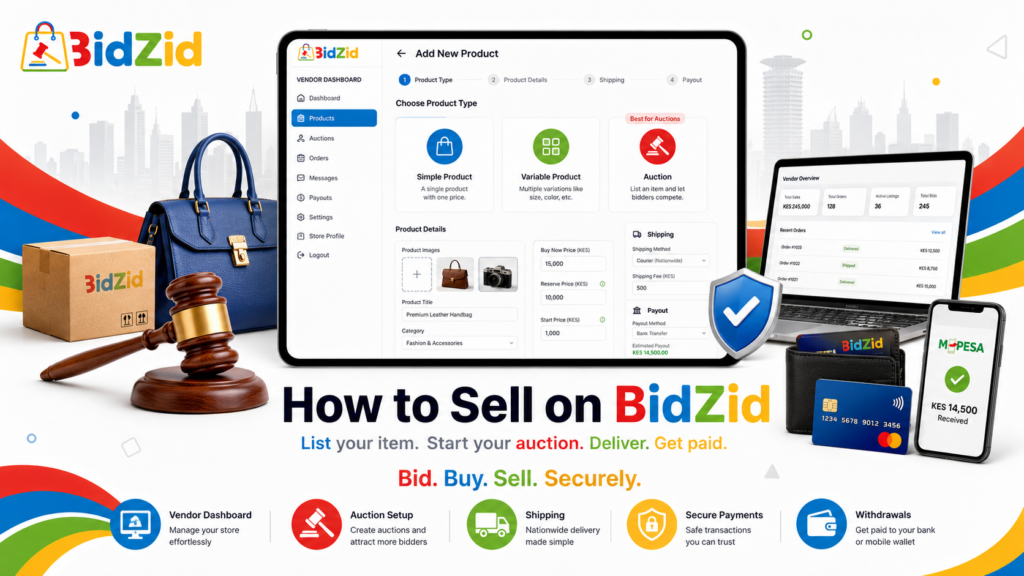
2. List Your Product
Once your vendor account is approved, log into your Vendor Dashboard and click:
Add New Product
You’ll have three main options:
Simple Product
A normal fixed-price item with one version. Think coffee, a watch, a home appliance or any product sold at one set price.
Variable Product
Use this when one product has different options. For example, a T-shirt available in Small, Medium and Large, or an item available in different colours.
Auction 🔨
This is where BidZid gets interesting.
- Starting Price — where the bidding begins
- Bid Increment — the minimum amount each new bid must increase by
- Reserve Price — the minimum price you’re willing to accept
- Auction Duration — auctions can run for up to 31 days
Then let the bidders take it from there.
Make Your Listing Worth Bidding On 📸
Good listings build confidence. Use clear photographs of the actual item, write an accurate description and be upfront about its condition.
If it’s used, say so. If there’s a scratch, show it. If something is missing, mention it.
The easier it is for a buyer to understand exactly what they’re bidding on, the more confidently they can bid.
3. Set Up Shipping 🚚
If you’re offering delivery, BidZid’s vendor system allows you to configure different shipping charges using Table Rate Shipping.
From your Vendor Dashboard:
Settings → Shipping → Table Rate Shipping
You can then create different rates depending on where the buyer is located or what you are shipping.
For example:
Nairobi: KES 300
Mombasa – Heavy Item: KES 800
For more advanced setups, Table Rate Shipping can also be configured around factors such as weight.
If an item is better suited to collection — such as furniture or large gym equipment — make that clear in the listing.
Remember: the seller remains responsible for arranging delivery or collection of the item.
4. Set Your Returns & Warranty Terms
Transparency saves everyone time.
You can add your own store terms under the “Terms & Conditions” tab in your store settings.
- Manufacturer warranties
- Your own seller warranty
- Voluntary returns
- Repair arrangements
- Specific collection or delivery conditions
If you offer a 6-month or 1-year warranty, clearly explain what it covers and who handles the logistics if a repair is required.
Your own store terms work alongside — and cannot override — BidZid’s marketplace policies or any rights required by law.
The BidZid Guarantee 🛡️
Buyers have a 48-hour BidZid Guarantee reporting window after actual delivery or collection to raise an eligible issue through the platform.
- The item does not arrive
- The item is materially different from its description
- The item arrives with serious undisclosed damage
- The item is materially non-functional despite being sold as functional
- The item is counterfeit or materially misrepresented
- The wrong or materially incomplete item is delivered
If an eligible dispute is raised in time before payout approval, any pending withdrawal request may remain unapproved while the matter is reviewed. If payout has already occurred, you remain responsible for an upheld claim and BidZid may recover or set off the relevant amount in accordance with the marketplace policies.
5. Process Your Sale & Get Paid 💳
Congratulations — your item sold. Now finish the transaction properly.
Step 1: Fulfil the Order
Arrange delivery or collection with the buyer according to the terms of your listing. Use a trackable courier where practical and keep proof of dispatch or handover.
Step 2: Create and Update the Shipment Where Applicable
If you are using the shipment function on the order, create the shipment and keep its status accurate. Once the item has actually been delivered, mark the shipment/order as Delivered in your Vendor Dashboard.
Do not mark an order Delivered before the buyer has actually received or collected the item.
When a shipment has been created through the Platform, the buyer may receive a Confirm Receipt option. This is the preferred BidZid flow because it gives us direct confirmation from the buyer. The option is generated by the shipment workflow and may not appear for every order or collection method. For pickup or another fulfilment method, BidZid may instead verify receipt using tracking, written buyer confirmation, proof of handover, direct contact with the buyer or other reliable evidence.
Step 3: The 72-Hour Withdrawal Eligibility
Seventy-two (72) hours after the buyer makes payment, your sale proceeds — after deduction of BidZid’s applicable Service Fee — may appear in your Vendor Dashboard as available for withdrawal.
This does not mean BidZid has paid you. It means you can now submit a withdrawal request.
Step 4: Request Your Withdrawal
Once the balance becomes eligible, go to the Withdraw section of your Vendor Dashboard and request payment to your registered Bank Account or M-Pesa destination.
Minimum Withdrawal Amount: KES 1,000
Step 5: BidZid Reviews the Request
Withdrawal requests are not approved automatically.
BidZid will not ordinarily approve a payout until the order or shipment has been marked Delivered, or delivery/collection has otherwise been reasonably established. The preferred normal flow is: create the shipment, deliver the item, mark it Delivered, and have the buyer confirm receipt where the button is available. For pickup or other exceptions, BidZid may verify delivery directly with the buyer or through other reliable evidence. Once BidZid is reasonably satisfied the item was received and there is no known dispute, chargeback, payment issue, KYC concern, fraud concern or other legitimate reason to keep the request pending, the payout may be approved. BidZid does not necessarily wait for the full 48-hour Buyer Protection reporting period before approving payout.
The important distinction is simple:
- 72 hours after payment = you may become eligible to request withdrawal.
- Delivery and BidZid approval = the withdrawal can be approved for payout.
- Payout = the money is actually transferred to your registered bank or M-Pesa destination.
The buyer’s 48-hour BidZid Guarantee still runs from actual delivery or collection. If a valid covered claim is raised within that period after your payout has already been approved, you remain responsible for the transaction and BidZid may recover or set off the relevant refund amount in accordance with the marketplace policies.
BidZid Service Fee
BidZid currently charges sellers an 8% Service Fee on the final item sale price. The applicable fee is deducted before your seller proceeds become available for withdrawal.
6. A Few Tips from Us ⚡
🎥 Film Your Packing
We encourage buyers to record an unboxing video for shipped purchases. Do the same from your side. Film the item’s condition and the packing process before you seal the parcel. If there is ever a dispute about what was sent, you’ll have useful evidence too.
📸 Good Photos Sell
You don’t need a professional studio. Good lighting, a clean background and several clear angles can completely change how buyers see your item. For any defect or sign of wear, include a close-up.
💬 Respond to Buyers
If someone asks a sensible question about your item, answer it. Responsive sellers inspire confidence — and a bidder who has confidence in the listing is far more likely to participate.
📣 Share Your Auction
Don’t just list it and wait. Share the auction with your own WhatsApp contacts, Instagram followers, Facebook audience or customers. Every extra interested buyer creates more competition. And more competition is exactly what an auction is built for.
⭐ Build Your Reputation
Every successful transaction helps build your seller profile. Describe your products accurately. Communicate clearly. Deliver when you say you will. Over time, good ratings and a strong transaction history can become one of your biggest selling tools.
Ready to Sell?
You’ve got the item. We’ve built the marketplace.
Now let the bidders decide what it’s worth. 🔨
BidZid
Bid. Buy. Sell. Securely.